Group Policy Changes in Windows 10 1709 Preview

As Windows 10 Fall Creators Update development winds down, it’s the grandiose time to examine updated and new Group Policy settings. There is no official documentation from the Group Policy team at this point, frankly there still might (or will) be a few changes to Group Policy settings. Still, it can't hurt to poke around current ADMX files because there are truly several things duller in our line of work than comparing thousands lines of text. Right?
Based on my results, the following Group Policy settings were added in Windows 10 version 1709 (Insider build 16278), or modified to an extent that warrants listing them here:
Note
An Excel spreadsheet containing policy descriptions, registry paths and possible settings (where applicable) is attached to this post.
| ADMX File | Parent Category | Policy | Class |
| MicrosoftEdge.admx | Microsoft Edge | Always show the Books Library in Microsoft Edge | Both |
| MicrosoftEdge.admx | Microsoft Edge | Provision Favorites | Both |
| MicrosoftEdge.admx | Microsoft Edge | Prevent changes to Favorites on Microsoft Edge | Both |
| ControlPanel.admx | Allow Online Tips | Machine | |
| DataCollection.admx | Limit Enhanced diagnostic data to the minimum required by Windows Analytics | Machine | |
| ExploitGuard.admx | Exploit Protection | Use a common set of exploit protection settings | Machine |
| FidoAuth.admx | Microsoft FIDO Authentication | Enable usage of FIDO devices to sign on | Machine |
| Handwriting.admx | Handwriting | Handwriting Panel Default Mode Docked | Machine |
| MDM.admx | MDM | Auto MDM Enrollment with AAD Token | Machine |
| messaging.admx | Messaging | Allow Message Service Cloud Sync | Machine |
| NCSI.admx | Network Connectivity Status Indicator | Specify global DNS | Machine |
| OSPolicy.admx | OS Policies | Enables Activity Feed | Machine |
| OSPolicy.admx | OS Policies | Allow publishing of User Activities | Machine |
| Passport.admx | Windows Hello for Business | Allow enumeration of emulated smart card for all users | Machine |
| Passport.admx | Windows Hello for Business | Turn off smart card emulation | Machine |
| Passport.admx | Windows Hello for Business | Use PIN Recovery | Machine |
| Passport.admx | Windows Hello for Business | Configure device unlock factors | Machine |
| Passport.admx | Windows Hello for Business | Configure dynamic lock factors | Machine |
| Power.admx | Power Throttling Settings | Turn off Power Throttling | Machine |
| PushToInstall.admx | Push To Install | Turn off Push To Install service | Machine |
| Search.admx | Search | Allow Cloud Search | Machine |
| SkyDrive.admx | OneDrive | Prevent OneDrive from generating network traffic until the user signs in to OneDrive | Machine |
| StartMenu.admx | Remove and prevent access to the Shut Down, Restart, Sleep, and Hibernate commands | Machine | |
| TPM.admx | Trusted Platform Module Services | Configure the system to clear the TPM if it is not in a ready state. | Machine |
| TPM.admx | Device Health Attestation Service | Enable Device Health Attestation Monitoring and Reporting | Machine |
| WindowsDefender.admx | Attack Surface Reduction | Exclude files and paths from Attack Surface Reduction Rules | Machine |
| WindowsDefender.admx | Attack Surface Reduction | Configure Attack Surface Reduction rules | Machine |
| WindowsDefender.admx | Controlled Folder Access | Configure allowed applications | Machine |
| WindowsDefender.admx | Controlled Folder Access | Configure Controlled folder access | Machine |
| WindowsDefender.admx | Controlled Folder Access | Configure protected folders | Machine |
| WindowsDefender.admx | Network Protection | Prevent users and apps from accessing dangerous websites | Machine |
| WindowsDefenderSecurityCenter.admx | App and browser protection | Prevent users from modifying settings | Machine |
| WindowsDefenderSecurityCenter.admx | App and browser protection | Hide the App and browser protection area | Machine |
| WindowsDefenderSecurityCenter.admx | Device performance and health | Hide the Device performance and health area | Machine |
| WindowsDefenderSecurityCenter.admx | Enterprise Customization | Specify contact company name | Machine |
| WindowsDefenderSecurityCenter.admx | Enterprise Customization | Specify contact email address or Email ID | Machine |
| WindowsDefenderSecurityCenter.admx | Enterprise Customization | Configure customized notifications | Machine |
| WindowsDefenderSecurityCenter.admx | Enterprise Customization | Configure customized contact information | Machine |
| WindowsDefenderSecurityCenter.admx | Enterprise Customization | Specify contact phone number or Skype ID | Machine |
| WindowsDefenderSecurityCenter.admx | Enterprise Customization | Specify contact website | Machine |
| WindowsDefenderSecurityCenter.admx | Family options | Hide the Family options area | Machine |
| WindowsDefenderSecurityCenter.admx | Firewall and network protection | Hide the Firewall and network protection area | Machine |
| WindowsDefenderSecurityCenter.admx | Notifications | Hide non-critical notifications | Machine |
| WindowsDefenderSecurityCenter.admx | Notifications | Hide all notifications | Machine |
| WindowsDefenderSecurityCenter.admx | Virus and threat protection | Hide the Virus and threat protection area | Machine |
| WindowsUpdate.admx | Windows Update | Allow updates to be downloaded automatically over metered connections | Machine |
| WindowsUpdate.admx | Windows Update | Configure Automatic Updates | Machine |
| WindowsUpdate.admx | Windows Update for Business | Select when Preview Builds and Feature Updates are received | Machine |
| WindowsUpdate.admx | Windows Update | Do not allow update deferral policies to cause scans against Windows Update | Machine |
| WindowsUpdate.admx | Windows Update for Business | Manage preview builds | Machine |
| wwansvc.admx | Cellular Data Access | Let Windows apps access cellular data | Machine |
| wwansvc.admx | WWAN UI Settings | Set Per-App Cellular Access UI Visibility | Machine |
| StartMenu.admx | Remove the People Bar from the taskbar | User |
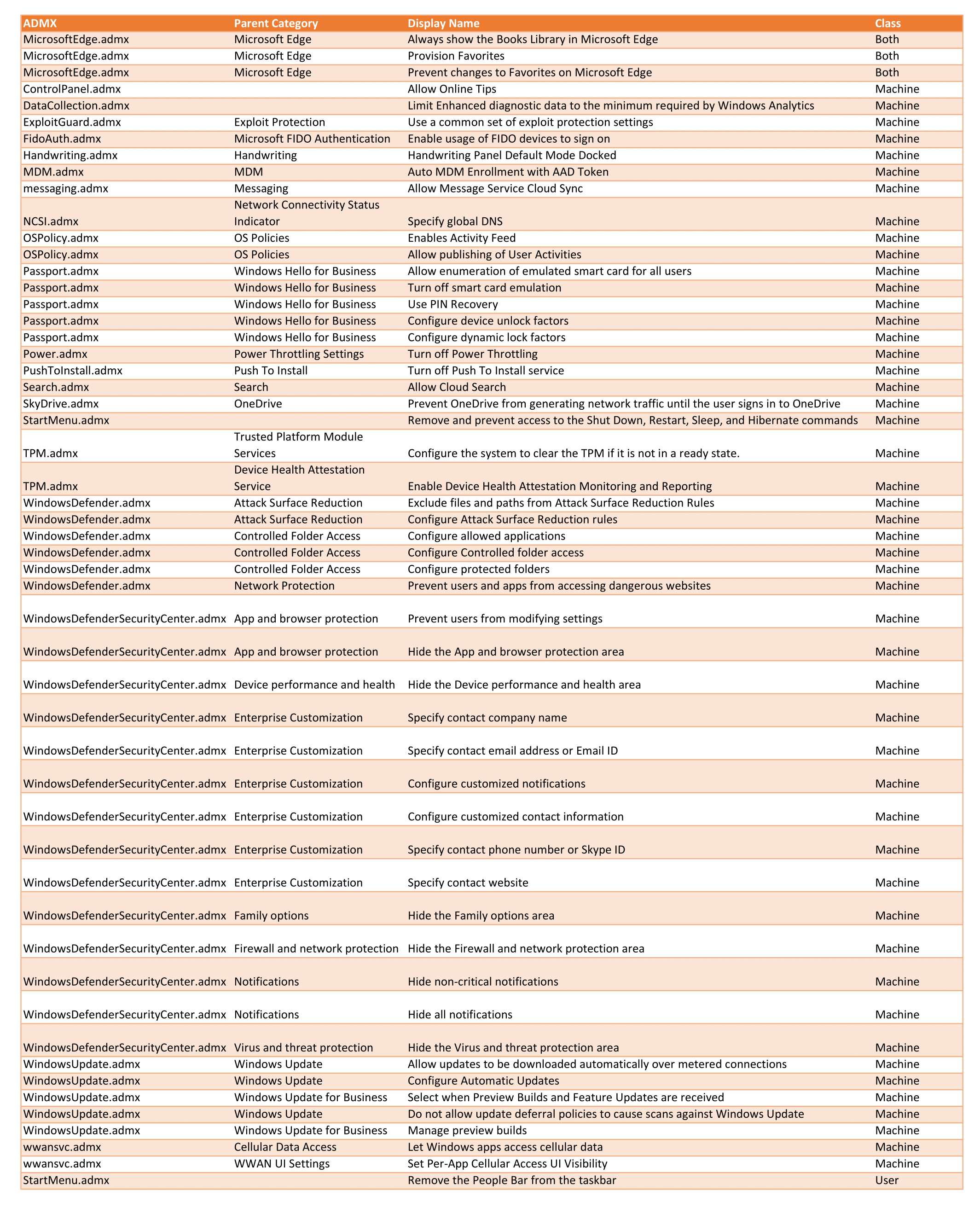
Notable changes are:
- You can now audit, configure, and manage Windows system and application exploit mitigation settings. (You don’t need to be using Windows Defender Antivirus to take advantage of this feature!)
- You can now configure Controlled folder access in Windows Defender Antivirus in order to protect valuable data from malicious apps and threats, such as ransomware.
- You can now remove the People Bar from the taskbar using Group Policy.
- You can now enable Power Throttling via GPO in order to enhance battery life while still giving users access to powerful multitasking capabilities of Windows.
- You can now configure a default set of favorites in Microsoft Edge, which will appear for employees. In addition, you can prevent users from adding their own favorites.
- You can now simplify TPM provisioning if the TPM is detected to be in any state other than Ready.
Note
Windows Update settings were updated and expanded to reflect recent changes to Windows as a Service.
As a side note, Windows Firewall is being rebranded as Windows Defender Firewall across the board. As this change was not relevant, I did not include it in the spreadsheet.
Additionally, the Group Policy team is apparantely changing the scope of some policies as follows:
Previously: Both, 1709: Machine
- Passport.admx: PIN Complexity\Require digits
- Passport.admx: PIN Complexity\Require lowercase letters
- Passport.admx: PIN Complexity\Maximum PIN length
- Passport.admx: PIN Complexity\Minimum PIN length
- Passport.admx: PIN Complexity\Expiration
- Passport.admx: PIN Complexity\History
- Passport.admx: PIN Complexity\Require special characters
- Passport.admx: PIN Complexity\Require uppercase letters
Previously: User, 1709: Both