Patching Hibernated AVD Personal Desktops, Step by Step

Hibernation is one of the nicest things you can give users of Azure Virtual Desktop Personal desktops. They disconnect in the evening, Autoscale hibernates the VM, and the next morning every window, every unsaved file and every half-finished build is exactly where they left it. You only pay for storage while it sleeps.
It is also why those desktops are hard to patch. A VM that sleeps every
night is never awake when maintenance runs. This post describes how I am
solving that in
Invoke-AvdPersonalNightlyPatching.ps1,
with one figure per stage, from the nightly schedule down to the last tag.
Work in progress
The script and its Azure DevOps pipeline are in endpoint-toolkit,
but they are not finished. The pipeline ships with its scheduled runs in
read-only Audit mode, and stays that way until the six canary
checks listed at the end have passed. Treat everything below as the design,
not as a field report.
Why hibernated desktops miss their updates
Three things come together here.
- Azure Update Manager is out. It does not support Windows 10 and 11 client images. For those, Microsoft points to Intune and Windows Autopatch, and Autopatch supports Personal persistent VMs.
- Intune only reaches a VM that is running. It cannot wake a hibernated or deallocated VM. A desktop that sleeps every night gets its Defender definitions and its cumulative update when the user resumes it in the morning, which means the updates install while the user is working.
- Waking the VM yourself has two traps. If automation starts a Personal VM and nobody signs in, Autoscale hibernates or deallocates it again, possibly in the middle of an install. And a reboot or a plain deallocate throws away the session in RAM, which is what hibernation was for.
So the job is: wake the desktops at night, keep Autoscale away while they are serviced, install what can be installed without destroying a session, and put every VM back into the state it was in. That last part matters most. A VM that was hibernated has to end up hibernated, with the same session in it.
The orchestrator calls the ARM REST API directly, and inside the guest it uses the Windows Update Agent COM API, so nothing has to be installed on the session hosts. It pairs with the Personal host pool Bicep modules from October, which deploy the scaling plan it relies on.
The night at a glance

The
pipeline
has two schedules, both Monday to Friday. At 00:00 UTC the servicing stage
runs. It does not touch the whole fleet: with -CohortCount 5 and
-CohortIndex -1, every host is assigned to one weekday by hashing
its short name with SHA-256. The assignment is stable, needs no state, and
spreads the fleet evenly, so Friday is no busier than Monday. With four
cohorts instead, Monday to Thursday each take a quarter, and Friday becomes a
catch-up night that only wakes hosts without a clean run in the last 96
hours.
Within a night, hosts move through a sliding window: at most 60 in flight, at most 15 wakes a minute, so a whole cohort does not hit the region's capacity at once. A circuit breaker stops new work when at least 5 hosts and 20% of those processed have failed. An optional cutoff stops new wakes at a local hour, for example 05:00 in Berlin, and lets the hosts already in flight finish.
At 05:15 UTC a second stage runs in MorningUnlock mode. It
declares no dependency and takes no environment lock, so it runs even when the
servicing stage is hung. It returns drained hosts to service and clears locks a
crashed run left behind, before anyone signs in.
One host, end to end
Everything that happens to a single session host fits in seven steps. Each one has a way to go wrong, and for each the script picks the outcome that keeps the user's session safe, even when that means leaving a VM running.

1. Gate the host
Before a single VM is touched, the script checks that the host pool is of
type Personal and finds its enabled scaling plan. The plan's
exclusionTag is the one tag Autoscale promises to leave alone, and
it is the only thing standing between a woken VM and the 60-minute hibernation
race. So the check fails closed: no visible plan, or a plan with an empty or
unexpected tag, and the pool is skipped with
ScalingPlanExclusionTagMissingOrMismatch. If RBAC hides the plan's
resource group, you pass -ScalingPlanResourceId or
-ExclusionTagName. A pool without any scaling plan needs an
explicit -AllowNoScalingPlan.
Then, per host: a VM tagged AvdLegalHold or
AvdLifecycleState=Quarantined is skipped (the same tags my
inactive-host cleanup script
honours), a live AvdPatchLock means
another run owns it, and the cohort filter decides whether tonight is its night.
Last, the AVD broker is asked for user sessions. An active session means
someone is working, and the host is left alone.
2. Take the lock
Hosts wait in a queue, and a queue goes stale. So when a host is admitted to
the window, the script re-reads its broker sessions and power state. Then it
merges two tags: the scaling plan's exclusion tag with the value
AvdNightlyPatch, and AvdPatchLock, which records the
run ID, the VM ID, the prior power state, whether new sessions were allowed, and
an expiry. The lock is also the crash-recovery journal: if the run dies, the
next one knows what state to restore. ARM allows 50 tags per resource, so a VM
that would go over that is skipped rather than half-tagged.
After the tag write it checks the power state once more. If Autoscale moved
the VM in that moment, the lock is released and the host is skipped. Otherwise
the session host is drained with allowNewSession=false.
3. Wake
A POST /start resumes a hibernated VM, and the script waits for
PowerState/running and a ready VM agent. Right after the wake it
asks the broker again. If someone signed in in the meantime, the VM stays
running and the host is unlocked. If the region has no capacity
(AllocationFailed, ZonalAllocationFailed), the host is
unlocked and reported; a failed resume does not touch the hibernated disk.
4. Service inside the guest
The servicing itself is one managed Run Command,
AvdPatch-<run>, running as SYSTEM. It is described in the
next section. Before creating it, the script deletes finished
Avd* Run Commands, so a VM never runs into Azure's limit of 25
managed Run Commands.
The one failure here that needs a human is a timeout. If the Run Command
times out, the PowerShell wrapper is gone, but TiWorker may still
be committing a cumulative update. Hibernating or deallocating the VM then could
damage the install, so the VM stays running with its exclusion tag in place and
is reported as NeedsOperatorTriage.
5. Restart, only when needed
A restart happens only when Windows asks for one and there is either no
session on the host or the session's grace period is over (more on that below).
The restart is coordinated from inside the guest: a one-shot scheduled task
fires 20 seconds later, checks the sessions and loaded user hives again, and
only then calls shutdown /r. The orchestrator then verifies that
LastBootUpTime really advanced, reads the new UBR, triggers an
Intune sync and waits 300 seconds for the VM to settle before step 6.
6. Restore the power state
A VM that was hibernated goes back with
POST deallocate?hibernate=true. A VM that was deallocated is
deallocated, and a running VM stays running. A host that was restarted with no
session in it is hibernated again by default, so it resumes quickly in the
morning.
The rule that is never broken is in this step. If hibernation fails, the
script retries three times and then leaves the VM running
(HibernateRestoreFailed_LeftRunning). It never falls back to a plain
deallocate, which would discard the session in RAM. A running VM costs some
compute until morning; a lost session costs someone their work.
7. Unlock and record
Finally, allowNewSession goes back to what it was, and the lock
and exclusion tag are deleted, but only if they still hold this run's values.
An operator who pinned the exclusion tag to OpsPin in the meantime
keeps their tag. The comparison is case-insensitive, because ARM tag names are.
The last write is AvdPatchState: when the host was last serviced
cleanly, its UBR, the outcome, and when a deferral started.
If a run crashes between steps 2 and 7, its lock expires. The
MorningUnlock stage and the next servicing run both find expired,
idle locks, restore the drain flag and clear the tags. A lock whose Run Command
is still running is left alone and reported for an operator to look at.
Inside the guest

The guest script starts by looking around: boot time, UBR, whether VBS is
running, whether the Hotpatch policy AllowRebootlessUpdates is set,
whether quality updates are paused, free disk space, and a pending restart. It
counts sessions three ways: what the broker reported before the wake, what
WTSEnumerateSessionsW reports now, and which user registry hives are
loaded. That union matters. A hibernated VM can look empty to one source and
still hold a user's session, and treating such a host as a zero-session host
would mean restarting it.
Defender signatures are always updated first, because they never need a restart and are what goes stale fastest. Then the stop gates: an active session, paused quality updates (an Autopatch ring on pause wins), less than 10 GB free, or a busy installer each end the run with nothing installed. A restart that was already pending on a host with no session is carried out first, and the updates wait for the next visit.
The Windows Update search accepts security, critical, rollup, definition and regular updates, and refuses the Upgrades and Feature Packs categories. A nightly patch job is not how a fleet should end up on 25H2 or 26H2. Drivers and preview updates need an explicit switch.
Then the decision that makes this work with hibernation. If a disconnected session is in RAM, only updates that never restart are installed: Defender definitions and anything else Windows Update marks as never requiring a reboot, plus Hotpatch updates on hosts where VBS is running and the Hotpatch policy is set. Everything else is deferred, and the host is not restarted. If there is no session, every approved update is installed, and the host restarts if Windows asks for it.
Deferring cannot go on forever. The first deferral starts a clock, stored in
AvdPatchState. Once -DisconnectedSessionGraceDays (3 by
default) have passed, the next visit installs everything and restarts the host,
even with a disconnected session. An active session still blocks the restart.
That is a deliberate trade: a user who leaves a desktop disconnected for days
loses that session to a quarterly baseline, but no desktop stays unpatched
indefinitely.
The script ends with an Intune sync, waits up to 90 seconds for
omadmclient to finish, and returns a single
AVDPATCH_JSON line that the orchestrator parses.
Why Hotpatch makes this worthwhile
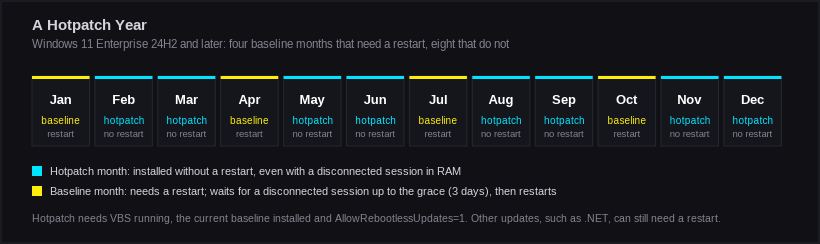
Without Hotpatch, the session rule above would defer almost every cumulative update on a desktop that is always disconnected, and the grace period would end in a restart every month. With Hotpatch on Windows 11 Enterprise 24H2 and later, the security update installs without a restart in eight months of the year. Only the four quarterly baseline months, January, April, July and October, need one.
That needs a few things in place. The Intune quality update policy has to
allow Hotpatch, which sets AllowRebootlessUpdates. VBS has to be
running, and on Azure that has to coexist with
hibernation.
The README lists the image and VM settings I use for that. And the host has to
install every baseline, or it falls out of Hotpatch eligibility. Other updates,
such as .NET, can still require a restart in a hotpatch month.
Modes, permissions and the tag contract
The script has five modes. Audit, the default, is read-only and
reports what it would do. Triage is read-only too, and inspects
locks and leftover Run Commands. MorningUnlock is the safety net.
LocalGuestProbe runs the guest script's read-only probe on the
machine you are on, with no Azure calls at all, which is handy on a golden
image. Execute does the work.
For permissions, the README contains a custom role instead of
Virtual Machine Contributor. It can read host pools and scaling plans, drain
session hosts, start, deallocate and hibernate VMs, manage Run Commands and
tags, and it cannot delete a VM or a disk. Be aware that
runCommands/write still means SYSTEM code execution on every VM in
scope, so the managed identity behind the pipeline deserves the same care as
any other privileged account.
These are the tags involved:
| Tag | Written by | Purpose |
|---|---|---|
Scaling plan exclusionTag | This script, while servicing | Keeps Autoscale from hibernating the VM mid-install. An operator's own value is preserved. |
AvdPatchLock | This script, until it expires | Single-writer lock and crash journal: run, prior power state, drain flag, expiry. |
AvdPatchState | This script, permanently | Last clean run, UBR, outcome and deferral start, for catch-up nights and the grace clock. |
AvdLegalHold, AvdLifecycleState | Operators | Shared with the inactive-host cleanup script: a host on legal hold or in quarantine is not touched. |
Where it stands
The code is written, and an offline regression suite,
Test-InvokeAvdPersonalNightlyPatching.ps1, runs the logic against
mocked ARM and Windows Update responses. What it has not had yet is real
nights on real desktops. Before the pipeline's scheduled mode moves from
Audit to Execute, six canary checks have to pass:
- LAB-01: an unsaved file in an editor survives a hibernate, a hotpatch night and a resume, with no restart.
- LAB-02: a paused Autopatch ring is honoured, and no feature update is installed.
- LAB-03: an unpatched host with no session takes its baseline, restarts, syncs Intune and ends up hibernated again.
- LAB-04: Windows Update and Defender downloads work as SYSTEM through the corporate proxy.
- LAB-05: an operator's own exclusion tag value survives a run.
- LAB-06: an expired lock is reported by Triage without changes and cleared by MorningUnlock, while quarantined hosts stay drained.
When those have run, I will write up what they found. If you patch hibernated Personal desktops another way, I would like to hear how.